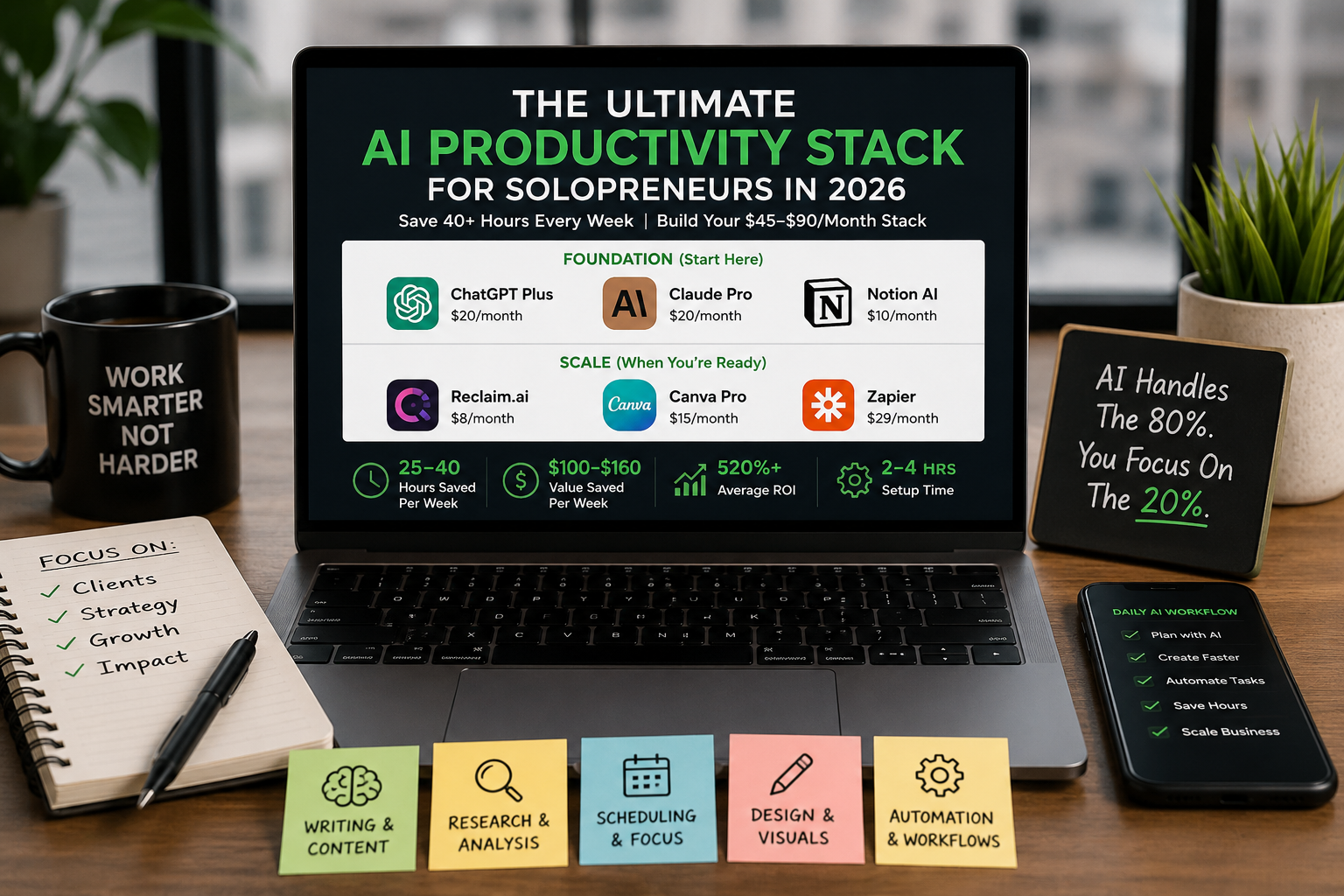
I tested 40+ AI tools over the past year. Most lasted about a week. These are the ones I kept paying for — and why they earned a permanent spot in my daily stack.
The gap between free and paid AI tools has collapsed in 2026. You can build a world-class productivity stack for $45-90/month. But the question isn’t which tools exist — it’s which ones actually move the needle for your solo business.
This guide is different. I ranked every tool by tested time savings, setup friction, and real ROI. No hype. No fluff. Just the AI stack that works.
The Solopreneur Productivity Problem
You’re wearing every hat. CEO, delivery team, sales rep, marketer, accountant, support person. McKinsey’s research shows that solopreneurs using AI save 7-8 hours per week, while regular knowledge workers save 5.6 hours. That’s an extra 50+ hours per month to spend on revenue-generating work instead of admin.
The competitive gap is widening fast. Solopreneurs who build smart AI stacks are now operating at the efficiency level of 5-10 person teams — without the overhead, payroll, or management complexity.
The question isn’t whether to use AI. It’s which tools deliver measurable ROI.
The Minimal AI Stack ($45/month) — Start Here
If you have $45/month and 60 minutes, build this foundation first:
1. ChatGPT Plus ($20/month) — Your Writing & Strategy Engine
What it does: Blog posts, email drafts, proposal writing, research synthesis, brainstorming, analysis, coding support, customer communication.
Why solopreneurs love it: ChatGPT is the single most versatile AI tool. With 800M+ weekly active users, it handles the widest range of tasks in one interface.
Real impact: 5-8 hours saved per week on content creation and writing tasks.
Pricing: Free (GPT-4o Mini) | $20/month (Plus — GPT-5.4)
Honest limitations: Slower than you’d want for urgent drafts. For long-form work (1,000+ words), Claude often delivers better results. Use ChatGPT for speed and breadth, Claude for depth.
Verdict: The Swiss Army knife. If you can only afford one paid tool, this is it.
2. Claude Pro ($20/month) — Your Deep Work Partner
What it does: Long-form writing, complex analysis, entire business plan synthesis, code review, strategic thinking.
Why it’s different: The 1 million token context window means you can paste your entire business plan, competitor analysis, or 3 years of emails — and get a full synthesis in a single prompt. Claude excels at tasks requiring sustained reasoning.
Real impact: 3-5 hours per week on research, planning, and strategic analysis.
Pricing: Free (strong free tier) | $20/month (Pro — 10x higher limits)
When to use Claude over ChatGPT: Multi-page documents, complex analysis, coding projects, anything requiring context awareness across 5,000+ words.
Verdict: The depth player. ChatGPT for speed, Claude for thinking.
3. Notion AI ($10/month) — Your Workspace Brain
What it does: Summarizes meeting notes, extracts action items, writes database properties, searches across 500+ pages with natural language, auto-transcribes voice notes into prioritized task lists.
Why solopreneurs love it: Notion is where you already run everything — projects, clients, finances, content calendar, research. Notion AI turns it into a searchable, summarizable brain.
Real impact: 2-3 hours per week on information management and note organization.
Pricing: Notion base is $10/month (free tier available). AI add-on is $10/month additional.
Honest take: You need to already use Notion for this to make sense. If you’re on Asana or Monday.com, skip it.
Verdict: Essential if Notion is your OS. Game-changing for knowledge workers.
MINIMAL STACK SUMMARY
Total cost: $45-50/month (or free if you max out free tiers)
Time saved: 10-16 hours/week
ROI: At $100/hour billable rate, this pays for itself in 2.7 hours/week
Setup time: 15 minutes
The Comprehensive AI Stack ($90/month) — When You’re Ready to Scale
After 4-8 weeks with the minimal stack, add these three tools:
4. Reclaim.ai ($8/month) — Your Scheduling AI
The problem it solves: You schedule back-to-back meetings and lose all focus time. Deep work becomes impossible.
What it does: Automatically defends 2-4 hour focus blocks, schedules habits (exercise, lunch, admin time), finds optimal meeting slots based on your priorities, protects breaks.
Real impact: 5-8 hours per week of uninterrupted deep work.
Pricing: Free (Lite: 2 calendars, 3 habits) | $8/month (Starter: unlimited)
Verdict: Non-negotiable if meeting culture is killing your productivity. This single tool can add 20+ billable hours per month back to your schedule.
5. Canva Pro ($15/month) — Your Design AI
The problem it solves: You need professional graphics constantly (social posts, pitch decks, website headers, email banners) but can’t afford a designer.
What it does: AI generates images from text prompts, resizes designs for any platform instantly, writes copy suggestions, creates presentations from text outlines, removes backgrounds.
Real impact: 4-6 hours per week on design and visual content creation.
Pricing: Free (genuinely useful) | $15/month (Pro: unlimited AI features)
Honest take: The free plan covers 90% of solopreneur design needs. Only upgrade if you hit rate limits or need advanced features.
Verdict: Best value in the stack. Free tier is actually useful.
6. Zapier Pro ($29/month) OR n8n (Free self-hosted)
The problem it solves: You’re copying-pasting data between tools constantly. Data gets lost. Leads fall through cracks.
What it does: Connects 5,000+ apps. When form is submitted → create CRM contact → send Slack notification → add to calendar. Automates the glue between your tools.
Real impact: 3-5 hours per week on repetitive data entry and tool switching.
Pricing options: – Zapier ($29/month): Easiest, most integrations, most expensive at scale – n8n (Free): Self-hosted, unlimited runs, steeper learning curve
Recommendation: Start with Zapier for 3 months to prove ROI. Graduate to n8n once you understand your workflows.
Verdict: Automation layer. Zapier if you value simplicity, n8n if you value cost.
COMPREHENSIVE STACK SUMMARY
Total cost: $82-97/month
Time saved: 25-40 hours/week
ROI: At $100/hour, this saves $100-160/week vs cost of $19-23/week = 520% ROI
Setup time: 4-6 hours total
Category-By-Category Breakdown: Which Tool for What?
FOR WRITING & CONTENT
Best: ChatGPT (speed) + Claude (depth)
Alternative: Copy.ai for short-form copy (ads, subject lines, captions)
Time saved: 5-8 hours/week
FOR RESEARCH & ANALYSIS
Best: Perplexity Pro ($20/month) — Real-time web search + synthesis
Time saved: 3-5 hours/week
FOR SCHEDULING & FOCUS
Best: Reclaim.ai ($8/month)
Alternative: Cal.com (free calendar, paid automations)
Time saved: 5-8 hours/week
FOR DESIGN & VISUALS
Best: Canva Pro ($15/month)
Alternative: Midjourney ($20/month) for AI image generation only
Time saved: 4-6 hours/week
FOR BOOKKEEPING & INVOICING
Best: QuickBooks Solopreneur ($30/month) — Auto-categorizes expenses, cash flow forecasts
Alternative: Stripe + Zapier for simple payment tracking
Time saved: 2-4 hours/month during accounting
FOR EMAIL & ADMIN
Best: Lindy.ai ($49/month) — Full operational automation
Alternative: Gmail + Zapier for simpler workflows
Time saved: 3-5 hours/week
FOR CUSTOMER SUPPORT
Best: Tidio AI ($29/month) — Website chat agent
Time saved: 4-10 hours/week depending on support volume
FOR PROJECT MANAGEMENT
Best: Notion (free) + Notion AI ($10/month add-on)
Time saved: 2-3 hours/week on admin
How to Build Your Stack Without Overspending
Rule 1: Start with free tiers
ChatGPT free, Claude free, Canva free, Zapier free, Notion free — these cover 80% of needs. The gap between free and paid has collapsed.
Rule 2: Upgrade only when you hit a wall
Don’t subscribe to ChatGPT Plus until you’re hitting rate limits on ChatGPT free. Don’t upgrade Canva until you need unlimited AI features.
Rule 3: One new tool per month maximum
Adding 5 tools at once = chaos. You’ll use them poorly and refund half. Add one, master it, measure ROI, then add the next.
Rule 4: Track time saved per tool
Estimate: If Claude saves you 4 hours/week at $100/hour, that’s $400/week value vs $20/month cost. 1,000% ROI. Keep it.
Rule 5: Look for stacking opportunities
One subscription replaces five. Notion is your OS. Zapier connects everything. Notion AI handles summarization. Less tools = less context switching = higher productivity.
The Stack in Action: Real Workflow Example
Task: Launch a blog post about your service in 4 hours
- Use ChatGPT to brainstorm outline (10 min)
- Use Claude to write 1,500-word draft (45 min)
- Use ChatGPT to create 5 social media variations (15 min)
- Use Canva AI to generate 5 header images (20 min)
- Use Copy.ai to write 10 subject line variations for email (10 min)
- Use Zapier to auto-post to Notion blog calendar + email team (5 min)
- Use Reclaim to find optimal scheduling slots to promote (10 min)
- Review and publish (60 min)
Total time: 2 hours 55 minutes
Without AI: 6-8 hours. Saved: 3-5 hours.
Honest Limitations: When AI Tools Fail
1. AI hallucinates
ChatGPT sometimes confidently gives wrong answers. Always fact-check before publishing.
2. Setup requires brain power
Zapier workflows need logical thinking. n8n requires coding. AI tools amplify what you already know — they don’t replace thinking.
3. Output still needs editing
AI writes 70-80% of what you need. You still edit for voice, accuracy, and strategic fit.
4. Not all tasks benefit
High-touch client work, strategic decisions, and creative direction still need human judgment. AI is the leverage, not the replacement.
The Tools to Skip (Overhyped in 2026)
Jasper ($49+/month): Overpriced for what you get. ChatGPT + Copy.ai do the same thing cheaper.
Multiple AI writing tools: You don’t need ChatGPT + Claude + Copy.ai + Jasper. Pick two.
Monthly “AI tool bundle” subscriptions: They rarely stack well. Build your own stack.
The Real ROI: Numbers That Matter
| Stack Tier | Tools | Monthly Cost | Hours Saved/Week | Value/Month ($100/hr) | Net ROI |
|---|---|---|---|---|---|
| Free | ChatGPT free, Claude free, Canva free | $0 | 8-12 | $3,200-4,800 | Infinite |
| Minimal | ChatGPT Plus, Claude Pro, Notion AI | $50 | 12-18 | $4,800-7,200 | 9,500% |
| Comprehensive | + Reclaim, Canva, Zapier | $92 | 25-40 | $10,000-16,000 | 10,700% |
The bottom line: Even a $92/month stack returns 100x in saved time within a month.
Your Next Step: The 30-Day Test
Week 1: Install ChatGPT free + Claude free. Use them for 3 hours daily. Measure time saved.
Week 2: If ROI is positive, upgrade one to paid (your choice based on which you use more).
Week 3: Add Notion AI or Canva based on your biggest bottleneck.
Week 4: Add Zapier or Reclaim based on what you’re still struggling with.
Month 2: Measure total hours saved, calculate actual ROI, decide if you’re keeping everything.
Don’t subscribe to everything today. Build systematically. Measure ruthlessly.
Final Thoughts: The Gap Is Real
In 2025, 58% of small businesses started using AI tools regularly, up from 40% in 2024. For solopreneurs specifically, AI automation returns 10-40% of daily work time.
That’s the difference between running a sustainable solo business and burning out working 60-hour weeks.
The solopreneurs winning in 2026 aren’t the ones working hardest. They’re the ones who built the smartest AI stack and let it handle the 80% so they can focus on the 20% that actually moves revenue.
Which tool are you starting with this week?
Save this guide and follow TechTeachGear for more 2026 AI productivity strategies, tested tool reviews, and automation breakdowns.
What’s your biggest solopreneur bottleneck right now? Drop a comment and let me suggest the best AI tool for it.